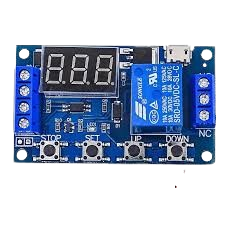
Multifunction Delay Timer Relay Module
General Specifications
-
Operating Voltage: 6V–30V (supports Micro USB 5.0V input)
-
Trigger Signal: High-level trigger (3.0V – 24V)
-
Output Load Capacity:
-
DC: ≤30V / 5A
-
AC: ≤220V / 5A
-
-
Static Current: 20 mA
-
Working Current: 50 mA
-
Service Life: >100,000 operations
-
Working Temperature: –40°C to +85°C
-
Dimensions: 62 mm × 38 mm × 17 mm
-
Time Range: 0.1 seconds to 999 minutes (continuously adjustable)
-
Isolation: Optocoupler isolation for strong anti-interference
-
Memory: Parameter retention after power loss
-
Build Quality: Industrial-grade PCB
Operating Modes
P1 – Delay Off Modes (Single Event Trigger)
-
P1.1: Relay activates after a trigger, stays on for OP time, then turns off. Retrigger is ignored during OP.
-
P1.2: Retriggering during OP restarts the OP timing.
-
P1.3: Retriggering during OP turns the relay off and stops the timer.
P2 – Delay On Mode (Delayed Start)
-
On trigger, relay remains off during CL time, then turns on for OP time, then off.
P3 – Cyclic Timer Modes
-
P3.1: Trigger starts a repeating cycle of ON (OP) and OFF (CL). Retrigger stops the cycle.
-
P3.2: Same as P3.1 but starts cycling automatically at power-on, no trigger needed.
-
LOP: Number of cycles (1–999, “—” for infinite loop)
-
P4 – Signal Hold Mode
-
Relay stays on as long as the trigger signal is present. After signal ends, it remains on for OP time, then turns off. Retrigger resets the timer.
Time Range Selection
Adjustable via the STOP button:
-
XXX(e.g. 005): 1 to 999 seconds -
XX.X(e.g. 3.2): 0.1 to 99.9 seconds -
X.X.X(e.g. 3.2.1): 1 to 999 minutes
Example: To set OP to 3.2 seconds, choose
XX.Xformat, then set value to3.2.
Parameter Definitions
-
OP: ON duration (relay closed)
-
CL: OFF duration (relay open)
-
LOP: Loop count (used in P3.1/P3.2)
Each mode shares these parameters. If you switch from P1.1 to P1.2, the previously set OP value carries over.
Parameter Setting Instructions
-
Select Mode:
-
From main screen (
000), long-press SET (2s) to enter mode selection. -
Use UP/DOWN to scroll through modes (P1.1 to P4).
-
-
Set Parameters (OP, CL, LOP):
-
Press SET to cycle through each parameter.
-
Use UP/DOWN to adjust values (long-press to scroll fast).
-
Press STOP to adjust time unit/decimal point.
-
Long-press SET to save and return to main screen.
-
-
Main Display:
-
000(no decimal) = idle -
Decimal point ON = relay active
-
Additional Functions
Relay Control (STOP Button):
-
ON: Enable relay operation
-
OFF: Disable relay (emergency stop)
Toggle by short pressing STOP in the main screen. The state will blink and then return.
Sleep Mode (Power Saving):
-
C-L: Sleep after 5 minutes of inactivity (display off, relay functions normal)
-
O-d: Normal mode (display always on)
Toggle by holding STOP for 2 seconds.